
It is a common requirement to find duplicates, in most cases the duplicates need to be deleted, but in some cases the duplicates need to be kept.
Excel 2010 (even 2007?) got the feature under "DATA" to remove duplicate entries in column(s), called Remove Duplicates.
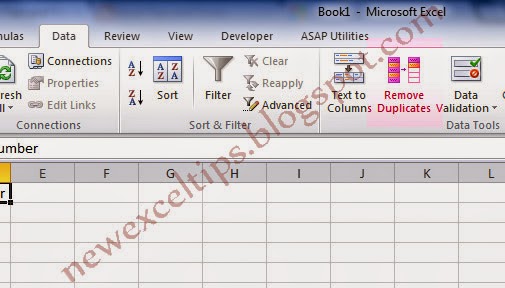
The issue with this tool it removes the duplicates and do not give more details.
If you want to mark the duplicates or want to VLOOKUP unique values you need use COUNTIF.
Let's see the example below,

There are many duplicate entries i column D. If you want to put "Duplicate" in column C, use
=IF(COUNTIF($D$2:$D$45,D2)>1,"DUPLICATE","")
The result will be,

Important to note, if there is two or more values, all considered "DUPLICATE". This will not help if you are looking to use unique values. For example if you try to index the unique values, let's say in column B.
You may want to use,
=IF(C2="DUPLICATE","",MAX(B$1:B1)+1)
The result will be a "1" in B15. In other words there is only one unique value in column D. But we know it is not true. To solve this we need to change the COUNTIF slightly.
Instead of
=IF(COUNTIF($D$2:$D$45,D2)>1,"DUPLICATE","")
We will use,
=IF(COUNTIF(D$2:D2,D2)>1,"DUPLICATE","")
and the result is,

Now you can use VLOOKUP to pull the unique values, Vlookup(1,B:D,2,FALSE) and so on.
The Key Point is to leave the first instance of the duplicates as "Unique".
There will be lot of other ways to do the same.
I will be happy to have any feedback.
Excel 2010 (even 2007?) got the feature under "DATA" to remove duplicate entries in column(s), called Remove Duplicates.
The issue with this tool it removes the duplicates and do not give more details.
If you want to mark the duplicates or want to VLOOKUP unique values you need use COUNTIF.
Let's see the example below,
There are many duplicate entries i column D. If you want to put "Duplicate" in column C, use
=IF(COUNTIF($D$2:$D$45,D2)>1,"DUPLICATE","")
The result will be,
Important to note, if there is two or more values, all considered "DUPLICATE". This will not help if you are looking to use unique values. For example if you try to index the unique values, let's say in column B.
You may want to use,
=IF(C2="DUPLICATE","",MAX(B$1:B1)+1)
The result will be a "1" in B15. In other words there is only one unique value in column D. But we know it is not true. To solve this we need to change the COUNTIF slightly.
Instead of
=IF(COUNTIF($D$2:$D$45,D2)>1,"DUPLICATE","")
We will use,
=IF(COUNTIF(D$2:D2,D2)>1,"DUPLICATE","")
and the result is,
Now you can use VLOOKUP to pull the unique values, Vlookup(1,B:D,2,FALSE) and so on.
The Key Point is to leave the first instance of the duplicates as "Unique".
There will be lot of other ways to do the same.
I will be happy to have any feedback.


 ExpiresDefault access plus 1 year